OCR Instantly download for android 11 (Red Velvet Cake)
APK file OCR Instantly 3.1.1 compatible with Android 11How to install APK / APKS / OBB file on Android
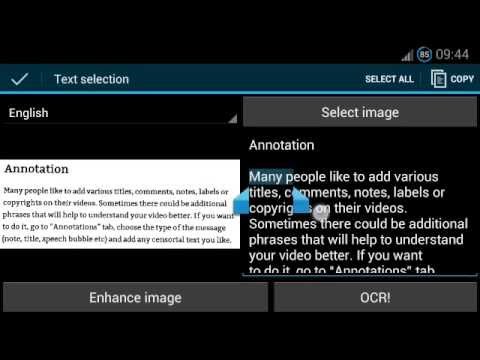

OCR stands for Optical Character Recognition which is a technology to convert image to text. This apps takes an image and converts it into digitized text which can then be shared to other applications such as Email and SMS, or simply copy paste the text to anywhere you like.
Full length review: http://www.youtube.com/watch?v=X5s948BJhRI
= Important Notes =
Garbage in, garbage out - make sure text is sharp and large enough for recognition.
**Make sure text is upright (horizontally aligned to the app)** Beware of camera rotation!
Handwritten text will not work.
Text on top of unclean background (images or borders/lines in excel sheet) will not work.
PDF source is not supported.
OCR for Gujarati, Persian and Punjabi is experimental and the result is very bad. You have been warned.
**Please read the in-app Help section for tips to improve OCR accuracy before leaving a bad review :) **
= Key Points =
Offline OCR
Built-in image enhancement tools
Simple to use but feature rich
Huge language support
= Pro Features =
Remove ads - Permanently removes all advertisements.
Image dewarp - Fix text lines that are wavy/bent due to curved book pages.
Save to sdcard & image share - Image/text can be saved to sdcard. Also allows sharing of enhanced image.
OCR modes - Advance OCR modes, character white/blacklist, and disable dictionary.
Paragraph scanning mode - Allows you to remove unwanted line breaks in paragraphs.
Create PDF - Creates PDF files where text can be selected and copy paste.
Text to speech - Text to speech language support. Also allows automatic text reading upon OCR.
Multi-language OCR - Perform OCR with multiple languages.
Full screen editing - Allows one to hide the image during text editing.
= Supports more than 60 languages =
Afrikaans, Albanian, Ancient Greek, Arabic, Azerbaijani, Bangla/Bengali, Basque, Belarusian, Bulgarian, Catalan, Cherokee, Chinese (Simplified), Chinese (Traditional), Croatian, Czech, Danish, Dutch, English, Esperanto, Estonian, Finnish, Frankish, French, Galician, German, Greek, Gujarati, Hebrew, Hindi, Hungarian, Icelandic, Indonesian, Italian (Old), Italian, Japanese, Kannada, Korean, Latvian, Lithuanian, Macedonian, Malay, Malayalam, Maltese, Middle English, Middle French, Norwegian, Oriya, Persian, Polish, Portuguese, Punjabi, Romanian, Russian, Serbian (Latin), Slovakian, Slovenian, Spanish (old), Spanish, Swahili, Swedish, Tagalog, Tamil, Telugu, Thai, Turkish, Ukrainian, Vietnamese
- LicenseFree
- File nameOCR Instantly
- File Version3.1.1
- Package namecom.thesimplest.ocr
- Size42.48 MB
- UploadedApril 7, 2024
- Android7.0 or later
- CategoryTools
- DeveloperTheSimplest.Net
- Developer site
- Developer emailadmin@thesimplest.net
- md5 hashf6cb4dc50a95af9c5aea47bdb4d251cc
- Architecturearm64-v8a armeabi-v7a
- Permissionsshow (4)